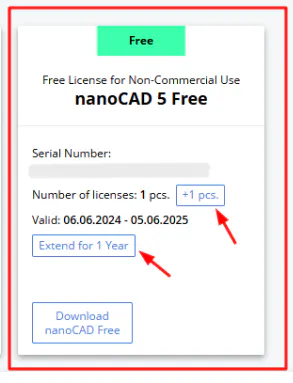
If you have previously obtained a license for nanoCAD 5 and the validity of this license is soon coming to an end, you will be able to extend it for another year through your personal account (this option will be available 7 days before the expiration date):
Please go to your personal account - https://nanocad.com/personal/
Find the nanoCAD 5 in the product list
Click "Extend for 1 year"
After that, you will need to request a new license file.
In this article, you can learn how to find the Registration Wizard and how to request a license file - https://support.nanocad.com/KB/View/66672121-how-to-obtain-license-for-nanocad
If you need to activate nanoCAD 5 on another device or reactivate your license on the old one (for example, after reinstalling your operating system), please click the “+1 pcs.” button.