


This article describes some mathematical and logical functions that you can use in nanoCAD Platform with AutoLISP.
Test of these functions will be done using simply nanoCAD Platforms command line, there is no need for separate LISP redactor or interpretator.
Example:
1 + 2 = 3AutoLISP:
(+ 1 2)Test:
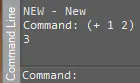
Example:
3 – 2 = 1AutoLISP:
(- 3 2)Test:
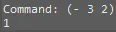
Example:
3 * 4 = 12AutoLISP:
(* 3 4)Test:
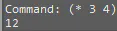
Example 1:
8 : 2 = 4AutoLISP 1:
(/ 8 2)Test 1:
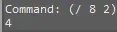
Example 2:
5 : 2 = 2.5AutoLISP 2.1:
(/ 5 2)Test 2.1:
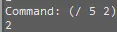
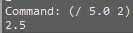
As you see, result is not what was expected here. This happened because in AutoLISP (/ 5 2) both numbers written as integers. If I need to get result in Real numbers, then at list one number in this example has to be written as Real too.
AutoLISP 2.3:
(/ 5.0 2)
Test 2.3:
In logical functions might be acceptable situations with ONLY ONE GIVEN ARGUMENT, but in this case the result will ALWAYS BE TRUE, no matter of the function or argument.
Check if arguments are equal.
Here:
T = TRUE
nil = FALSE
Example 1:
3 = 3 (True)AutoLISP 1:
(= 3 3)Test 1:
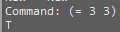
Example 2:
1 = 2 (FALSE)AutoLISP 2:
(= 1 2)Test 2:
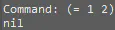
Some more important things about “equal” functions:
- if there is only one argument, then it will always be True, even if argument is nil (False):
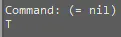
- if there are several arguments, then True will be only if all arguments are equal:
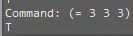
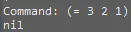
- if you comparing integer and real numbers and they values are the same, then result is True:
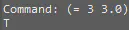
Check if arguments are NOT equal.
Example 1:
1 is not equal to 2 is TrueAutoLISP 1:
(/= 1 2)Test 1:
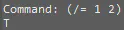
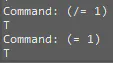
If there is only one argument, this function returns True, SAME AS EQUAL functions!
AutoLISP 2:
(/= 1) is same as (= 1) and returns same result -> True
Test 2:
Check if the left argument is less than right argument.
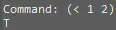
Example1:
1 is less than 2 is TrueAutoLISP 1:
(< 1 2) Test 1:
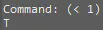
When it’s only one argument given, it’s always True:
AutoLISP 2:
(< 1)
Test 2:
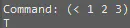
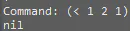
If there are several arguments, then function checks sequentially that each left argument is less than the right one.
AutoLISP 3:
(< 1 2 3)
Test 3:
AutoLISP 4:
(<1 2 1)Test 4:
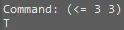
Check that left argument is less or equal to right argument.
Example:
3 <= 3 is TrueAutoLISP:
(<= 3 3)Test:
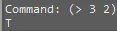
Check that left argument is greater than the right argument.
Example:
3 > 2 is TrueAutoLISP:
(> 3 2)Test:
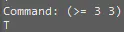
Check that left argument is greater or equal to right argument.
Example:
3 >= 3 is TrueAutoLISP:
(>= 3 3)Test:
Mathematical and logical functions are among the fundamental building blocks of AutoLISP programming in nanoCAD Platform. They allow you to perform calculations, compare values, and make decisions that form the basis of more advanced automation scripts.
Part one of this series you can find here:


